
On November 9, 2026 we installed Claude Code Router 3.1.3 from npm on a Mac, gave it one provider (a mock server on 127.0.0.1 with a dummy key) and started it. Before we had launched anything through it, it had written ANTHROPIC_BASE_URL=http://127.0.0.1:3456 into ~/.claude/settings.json, and the next plain claude session we opened went through the router.
Claude Code Router (CCR, claude-code-router on GitHub) is an open source, MIT-licensed local model gateway that lets Claude Code use models from other providers. Its README calls it “a local model gateway and control plane for coding agents” that gives Claude Code and nine other agents “one stable local endpoint”, while you manage the providers, models, routing rules and keys behind it.
That works well on one person’s machine, and CCR documents its own hardening. A company asks different questions: who sent this prompt, where the provider keys live, where prompts are logged, which providers may receive code. This post covers how CCR plugs into Claude Code, what we found on disk and on the network, and how a company gateway with a managed setting answers those questions. We ran Claude Code 2.1.319 on macOS 26.7.1. CCR facts come from its docs or our run, and Claude Code facts from Anthropic’s docs, read on November 9. We build Formal, and the Formal section says plainly that we haven’t tested it with CCR.
What is Claude Code Router?
Claude Code Router is a local model gateway that runs on your laptop. Claude Code sends its requests to http://127.0.0.1:3456 instead of Anthropic, and CCR forwards each one to the provider and model you picked, translating the API format when the provider needs it. Supported providers include OpenAI and Anthropic formats, Gemini, OpenRouter, DeepSeek, Moonshot, Mistral and several more, plus “custom compatible providers”.
On top of routing, it adds “retries, credential pools, key rotation, and ordered fallback models”, Fusion models and ToolHub for extra capabilities, and a log view with latency, tokens and a cost estimate per request. The CLI is the @musistudio/claude-code-router package on npm and wants Node.js 22 or later; a desktop app and a Docker image cover the other cases. Its commands are ccr start, ccr ui, ccr serve, ccr stop, and ccr "<profile>" to open an agent through a profile.
The project has changed a lot, and many tutorials describe an older version with a hand-edited config.json and “transformers”. Version 3 keeps its configuration in SQLite: “A legacy config.json is read only once as a migration source when no SQLite config exists” (configuration file).
How Claude Code Router plugs into Claude Code: ANTHROPIC_BASE_URL
Claude Code has one documented way to talk to a gateway: ANTHROPIC_BASE_URL plus a credential. Anthropic’s connection guide lists three credential options: ANTHROPIC_AUTH_TOKEN (sent as Authorization: Bearer), ANTHROPIC_API_KEY (sent as x-api-key), or an apiKeyHelper, “a command Claude Code runs to fetch your gateway credential”. A gateway credential “takes precedence over a saved claude.ai login or Console key”, so requests stop using your subscription and are billed to whatever account sits behind the gateway.
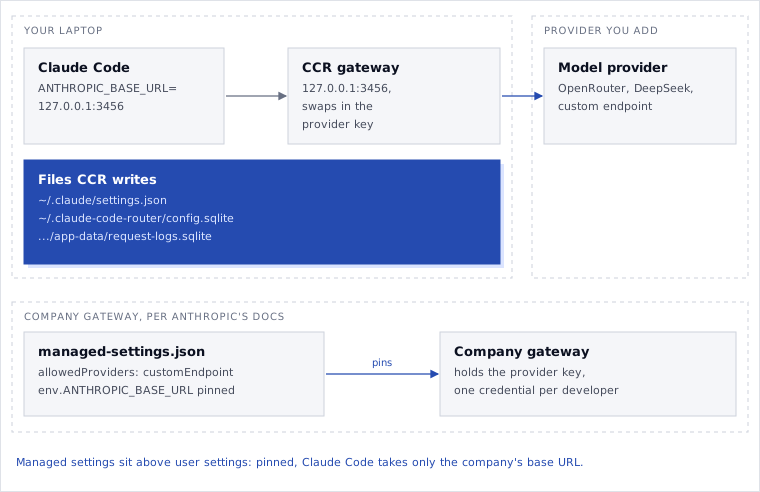
CCR uses exactly that. You create a profile for Claude Code on its Agent Config page, pick a model (and optionally one per tier: Fable, Opus, Sonnet, Haiku) and an Effect scope, “Only opened from CCR” or “System default” (Claude Code setup). This is what CCR wrote into ~/.claude/settings.json in our run (home directory shortened to ~):
{
  "apiKeyHelper": "~/.claude-code-router/bin/ccr-claude-code-api-key-default-claude-code",
  "env": {
    "CLAUDE_CODE_ENABLE_GATEWAY_MODEL_DISCOVERY": "1",
    "ANTHROPIC_BASE_URL": "http://127.0.0.1:3456",
    "ANTHROPIC_API_BASE_URL": "http://127.0.0.1:3456",
    "CLAUDE_AGENT_API_BASE_URL": "http://127.0.0.1:3456",
    "NO_PROXY": "127.0.0.1,localhost,::1",
    "no_proxy": "127.0.0.1,localhost,::1",
    "CLAUDE_CODE_DISABLE_UNKNOWN_MODEL_WINDOW_ENFORCEMENT": "1"
  }
}
Setting a model on the profile added ANTHROPIC_MODEL and ANTHROPIC_DEFAULT_OPUS_MODEL, ANTHROPIC_DEFAULT_SONNET_MODEL and ANTHROPIC_DEFAULT_HAIKU_MODEL, plus two CCR-specific copies. The apiKeyHelper is a two-line shell script that prints a CCR client key, not your provider key: CCR keeps the provider key and swaps it in on the way out. When you launch with ccr "Claude Code", a wrapper exports the same variables and unsets ANTHROPIC_API_KEY, ANTHROPIC_AUTH_TOKEN and the CLAUDE_CODE_USE_* flags for Bedrock, Vertex and Foundry before it starts claude.
A router is a different tool from a proxy. A proxy carries Claude Code’s traffic to the same host, which is how we hide the Anthropic key from Claude Code. A router changes where the traffic goes and which model answers it.
The built-in profile is System default
CCR’s docs say “A directly-opened Claude Code is not affected unless the scope is System default.” In version 3.1.3, the built-in Claude Code profile that CCR creates on first run has "scope": "global", which its UI labels “System default”. So the settings.json above was written by ccr serve itself, with one provider configured, before we opened any profile.
We checked what that means in practice:
- A plain
claude -p "Reply with one word: hello", with noccrin front, got its answer from our mock provider. - CCR merged its keys into an existing
settings.json: aNODE_EXTRA_CA_CERTSvariable and a deny rule we had put there were still there afterwards. - After
ccr stop,settings.jsonstill pointed at127.0.0.1:3456. The next plainclaude -p "hi"printed nothing for 45 seconds, until our timer killed it. Anthropic’s rollout guide describes that symptom for an unreachable base URL: Claude Code retries with backoff “and can sit with no output for several minutes”. - Switching the scope to “Only opened from CCR” removed CCR’s
settings.jsonand left timestamped.ccr-backup-*copies.
The same service start also wrote a third-party profile for the Claude desktop app (~/Library/Application Support/Claude-3p/, gateway http://127.0.0.1:3456, with a CCR client key in the file) and a Codex provider in ~/.codex/config.toml. If you only want CCR when you ask for it, set the Claude Code and Codex profiles to “Only opened from CCR” before you add a provider.
Can Claude Code use OpenRouter, Ollama or DeepSeek?
Yes, through Claude Code Router, and that’s why most people install it. OpenRouter and DeepSeek are named providers in CCR’s README: you add one with its key, pick its models, and set them on the Claude Code profile. Routing rules can match on request headers and bodies, apply prefixes and rewrites, retry, and fall back in order to the next model when one fails. Ollama works too, as a custom provider.
The per-tier fields let you, in CCR’s words, “run a strong provider model for Opus while keeping a cheaper one for Haiku”, which is mostly a cost decision: Haiku is the small, fast tier.
There’s no Ollama preset, though. We searched the 3.1.3 package and the string “ollama” doesn’t appear in its code or its UI bundle. A local model server goes in as a custom compatible provider, which is how we added our mock on 127.0.0.1. A local model is the one setup where prompts don’t leave the laptop.
With any remote provider, the opposite holds: it receives the whole request. In our run, each Claude Code turn was a 67,964-byte body with the system prompt, 12 tool definitions and the conversation, which includes any file contents Claude Code has read. Picking a provider is picking who reads your code.
Anthropic is explicit about this setup. Its gateway overview says “Anthropic doesn’t endorse, maintain, or audit other gateway products, and doesn’t support routing Claude Code to non-Claude models through any gateway.” If a Claude Code feature misbehaves on another model, Anthropic won’t help you with it.
LiteLLM comes up in the same searches. Teams usually deploy it on a server as a shared gateway, which puts it in the company-gateway category below.
What we saw when we tried it
We installed CCR with npm install --prefix into a scratch directory and ran it with HOME pointed at a throwaway folder, so nothing touched our real ~/.claude. npm skipped the install script of better-sqlite3, CCR’s SQLite driver, so we ran npm rebuild better-sqlite3 before the first start. The provider was a 77-line Node server on 127.0.0.1:18080 that answers like the Messages and Chat Completions APIs and logs each request it gets. The provider keys were sk-dummy-ccr-test-123, written before CCR’s first service start, and sk-dummy-ccr-test-456, saved through saveConfig, the management call CCR’s own web UI makes.
Our first Claude Code launch through the profile failed with:
API Error: 400 All target providers failed.We had left the profile’s Model empty, which CCR’s docs describe as keeping “Claude Code’s own default model”. Claude Code then asked for a Claude model that no provider in CCR served. Setting the Model to our mock’s model fixed it.
Provider keys in config.sqlite
CCR’s docs put the configuration in ~/.claude-code-router/config.sqlite. They don’t say whether keys are encrypted, so we looked:
$ sqlite3 ~/.claude-code-router/config.sqlite "select json_extract(value, '$.name'), json_extract(value, '$.api_key') from app_config, json_each(app_config.value_json, '$.Providers')"
mock-local|sk-dummy-ccr-test-123
mock-ui|sk-dummy-ccr-test-456

$ sqlite3 ~/.claude-code-router/config.sqlite "select name, encryption from api_keys"
Local Gateway|plain
Profile: Claude Code|plain
Profile: Codex|plain
Provider keys are plain JSON in the app_config table, and CCR’s own client keys sit in an api_keys table whose encryption column says plain. In the 3.1.3 code, plain is the only value it accepts. The file permissions are tight: CCR sets the directory to 0700 and config.sqlite to 0600, so other users on the Mac can’t read it. Any process running as you can, including the shell commands Claude Code runs, unless a sandbox rule or a deny rule covers that path. We covered what the Claude Code sandbox reads by default in another post.
CCR client keys also appear in the apiKeyHelper script, in ~/.codex/config.toml and in the Claude desktop app’s third-party config. CCR’s Docker guide is upfront about the sensitivity: a backup “contains provider credentials and CCR client keys, and may contain request / response data; store it as sensitive data.”
Request logs and prompt bodies
Request logs are off in a fresh 3.1.3 config ("requestLogs": false), and CCR’s observability page starts with “Enable Request logs”. Once you turn them on, body capture defaults to all, up to 50 MiB per body. We sent one request with a fake secret in the prompt:
$ sqlite3 ~/.claude-code-router/app-data/request-logs.sqlite "select client, provider, gateway_body_capture_policy, request_body_size_bytes from request_logs"
curl|mock-local|all|151
Claude|mock-local|all|67964
Claude|mock-local|all|67967
The first row’s request_body_text held our prompt verbatim, DB_PASSWORD=hunter2-not-real included. The authorization header was stored as [redacted]. The two Claude Code rows are the full turns described above, with headers such as user-agent: claude-cli/2.1.319 and x-claude-code-session-id. The client column comes from the User-Agent; no column records which CCR client key made the request.
With request logs off, no request row was written, but usage.sqlite still recorded the time, model, provider, status and token counts of each call. CCR says regular logs “are kept locally for the current day” and are cleaned up after the date changes: “They are useful for same-day troubleshooting, not long-term audit archiving.” We didn’t wait a day to check the cleanup.
Ports and local auth
Both listeners were on loopback while ccr serve ran:
$ lsof -nP -iTCP -sTCP:LISTEN
node  52430  ...  TCP 127.0.0.1:3458 (LISTEN)
node  52461  ...  TCP 127.0.0.1:3456 (LISTEN)
Port 3458 is the management UI and 3456 the gateway, run by a separate gateway-bootstrap.js process. The local auth held up in all four probes we tried: the management API answered 401 “CCR web authentication token is missing or invalid.” without its token and 403 “Forbidden host” to a foreign Host header, and the gateway answered 401 to a request with no client key and “Invalid or expired API key.” to a wrong one. The Docker guide warns that its default port mapping “listens on every host interface” and shows how to bind it to 127.0.0.1. We only tested the CLI.
Claude Code Router on a company laptop
None of the above is a defect. CCR is built for one person who wants to choose their models, and it binds to loopback, requires tokens and tells you to protect backups. The issue is scope: on a company laptop, the questions a security team asks have answers that live with the developer.
- Keys. Each developer holds their own provider keys, in plaintext, on their laptop. Offboarding means revoking keys at each provider a person added.
- Identity. CCR knows clients by key name. Its API keys page describes named client keys with expirations and local limits, which “Use it to identify a client, team, purpose, or automation”; the docs we read don’t describe SSO sign-in.
- Logs. When enabled, logs hold full prompts on the laptop for one day. That’s the opposite of what an audit needs on both counts.
- Providers. Any provider the developer adds, DeepSeek or OpenRouter or a custom endpoint, receives the code, wherever it’s hosted.
- Settings. The router edits user-level Claude Code settings, and so can the developer.
| Question | Claude Code Router 3.1.3 | Company gateway (Anthropic’s docs) | Formal (Formal docs) |
|---|---|---|---|
| Where the provider key lives | Laptop, plaintext in config.sqlite | “the provider key stays server-side” | Connector, as a Native User |
| What Claude Code holds | A CCR client key, printed by an apiKeyHelper | One gateway credential per developer, best delivered in managed settings | A placeholder key; the Endpoint attaches the user’s identity |
| Who sent this prompt | Client name from the User-Agent; named keys | The developer behind the credential | The Formal user, from SSO |
| Where prompts are logged | Off by default; when on, full bodies on the laptop for the day | Central, “log every model request” | Formal logs, with log schemas to encrypt or drop prompts |
| Which providers get code | Whatever the developer adds | The upstream the company configures | The host Claude Code called, under policy |
| Who changes the setup | The developer (and CCR) | Admins: managed settings pin the URL; the credential needs pinning too | Admins, through network rules and policies |
| Model routing and fallback | Yes, its main job | Depends on the product | None |
Claude Code LLM gateway for a company
Anthropic defines a gateway as “a proxy your organization runs between Claude Code and a model provider”, with two credentials: a developer credential, “each developer holds their own, issued by the gateway”, and a provider credential the gateway holds for the whole organization. The Other LLM gateways page lists what that buys: the provider key stays server-side, usage is attributed by developer or team, budgets and audit logging sit in one place, and you can change providers “without touching developer machines”. The tradeoff, in Anthropic’s words, is that “the gateway becomes infrastructure your organization operates”.
Anthropic also ships its own, the Claude apps gateway, “included in the claude binary”. Developers sign in “with your corporate identity provider through /login”, it enforces model access and managed settings by IdP group, and it emits OpenTelemetry usage metrics. Third-party gateways work too, LiteLLM among them, as long as they forward what Claude Code sends.
One thing a gateway doesn’t change, per the same overview: “The gateway decides where requests go, not which model the developer selects.” Choosing models per tier is still the developer’s call, which is the part CCR does well.
Pin Claude Code with allowedProviders
A gateway only helps if Claude Code can’t be pointed somewhere else. Since v2.1.285, managed settings can pin it. Anthropic’s instructions: set allowedProviders to ["customEndpoint"] in the managed settings file and put the gateway’s ANTHROPIC_BASE_URL in that file’s env block. “Claude Code then refuses a session pointed anywhere else, including at Anthropic directly or at a developer’s own proxy, and accepts ANTHROPIC_BASE_URL only with the value you set there.” On macOS the file is /Library/Application Support/ClaudeCode/managed-settings.json (managed settings):
{
  "allowedProviders": ["customEndpoint"],
  "env": {
    "ANTHROPIC_BASE_URL": "https://llm-gateway.example.com"
  }
}
The settings reference says a session on an unlisted provider “is refused at startup, at login, and when it next contacts the API”. Get the value exactly right: Anthropic’s managed settings page says an invalid allowedProviders is enforced as an empty allowlist, “so every API provider is refused and Claude Code doesn’t start on the machine.” The rollout guide adds that a managed ANTHROPIC_BASE_URL “cannot be overridden by a developer’s shell export”, since Claude Code applies it over the process environment and lower-precedence settings, which includes the user-level settings.json CCR writes.
Two limits stay. A developer who is an administrator on their own Mac can edit the managed file, which Anthropic says itself and we covered in our post on Claude Code hooks. And the gateway carries model requests only: Claude Code “also sends nonessential background traffic outside the gateway path, to Anthropic and to third-party services such as GitHub”, which CLAUDE_CODE_DISABLE_NONESSENTIAL_TRAFFIC=1 turns off. When we launched Claude Code through CCR with this file in place, the pin redirected every request and left CCR’s credential and model in place, as the next section shows.
The pin
We tested the pin on the same Mac on November 9: Claude Code 2.1.319, CCR 3.1.3 with its System default profile, and a second mock on 127.0.0.1:18090 standing in for the company gateway. The managed file was the one above with ANTHROPIC_BASE_URL set to http://127.0.0.1:18090, and we ran claude -p "hi" three ways, before and after installing it: through ccr 'Claude Code', as a plain claude, and with ANTHROPIC_BASE_URL=http://127.0.0.1:3456 exported in the shell.
| Launch | No managed file: CCR’s provider / company gateway | Pinned: CCR’s provider / company gateway |
|---|---|---|
ccr 'Claude Code' | 1 / 0 requests | 0 / 3 requests |
Plain claude | 1 / 0 requests | 0 / 3 requests |
Shell export to 127.0.0.1:3456 | 1 / 0 requests | 0 / 3 requests |
With the file in place, all three runs exited 0 with the mock’s reply. We didn’t see a refusal or an error. Claude Code used the managed URL over CCR’s settings.json, over the launcher’s environment and over the shell export, which is the “accepts ANTHROPIC_BASE_URL only with the value you set there” half of the docs. In these three launches the pinned value simply won, and nothing on screen told us the router had been bypassed.
Each pinned run sent a HEAD /api/hello, a GET /v1/models?limit=1000 and the message itself. This is the message request as the company gateway logged it, keys redacted:
POST /v1/messages?beta=true
user-agent: claude-cli/2.1.319 (external, sdk-cli)
authorization: Bearer ccr-profile-[REDACTED]
x-api-key: ccr-profile-[REDACTED]
model: mock-local/mock-model
The pin redirects the traffic; it doesn’t swap the credential. The key that reached the company gateway was CCR’s own client key, from the apiKeyHelper CCR had written into user settings, sent in both headers the way Anthropic documents for a helper. The model was still CCR’s mock-local/mock-model, from the user-level ANTHROPIC_MODEL, and every run printed [claude-code:unrecognized_model] for it on stderr. That’s the overview’s point about models again: the gateway picks the destination, and the developer still picks the model.
Our mock answered anything, so the runs succeeded. A gateway that checks credentials would reject a key it never issued. Two changes close the gap. The first is documented: the rollout guide puts the credential in the managed file too: “distribute one apiKeyHelper command in the managed settings file”, a command that authenticates to your secrets store as the developer, so each machine gets its own key. Managed settings sit above user settings, so that helper should take the place of the one CCR wrote; we haven’t rerun the test to confirm it. And the gateway should reject credentials it didn’t issue and log the attempt, which is also how you’d find the laptops that still have a router configured.
{
  "allowedProviders": ["customEndpoint"],
  "env": {
    "ANTHROPIC_BASE_URL": "https://llm-gateway.example.com"
  },
  "apiKeyHelper": "/usr/local/bin/get-gateway-key"
}
Where Formal fits (untested with Claude Code Router)
We haven’t run Claude Code Router against Formal. This section is what our docs say Formal does with Claude Code today, and what we’d check first with CCR in the path.
Formal doesn’t route between models. It isn’t a replacement for CCR’s routing or fallbacks; it governs whichever route you choose. Formal Endpoint runs on the laptop, and its Transparent Mode intercepts Claude Code’s connections at the operating system’s network layer, so there’s no base URL to change and nothing for a developer to re-point. With an LLM resource for the provider’s API, Formal records “the full prompt and completion text”, tool calls “including their names, arguments, and results” and token usage, tied to the Formal user who ran the agent. That’s the AI gateway model for agents on laptops.
The controls a company asks for map to documented features:
- Per-user spend budgets: the docs’ example policy blocks a user’s requests “after $50 in a day or $500 in a month”, and notes that spend refreshes every few minutes, “so a burst of requests can exceed a budget slightly.”
- Log schemas that encrypt prompt text and tool inputs with an asymmetric key, or drop
log.llm.messagesentirely. - Restricted Anthropic sign-ins, where “Personal Claude accounts and other orgs receive a 403 from Anthropic.”
- The Anthropic key kept on a Connector instead of the laptop, which is the setup in the proxy post linked above.
With CCR in the path, two things in our network rules reference decide what Formal would see, and they’re what we’d test first. The call to the provider doesn’t come from Claude Code. In our run it came from CCR’s gateway-bootstrap.js, a child of the ccr serve process; started with ccr start, the service runs as a daemon whose parent is launchd. process.is_claude_cli is true when “the connecting process or an ancestor is Claude Code”, so we’d expect a rule keyed on Claude Code not to match that connection. The other is the hostname: is_llm_hostname is true for “api.anthropic.com, claude.ai, chatgpt.com, cursor.sh, or a subdomain”, so OpenRouter or DeepSeek traffic would need its own LLM resource and a rule naming the host. The hop from Claude Code to 127.0.0.1:3456 is plain HTTP on loopback, and we don’t know yet what Transparent Mode does with it. We’ll update this post when we’ve run it.
If you run Claude Code Router on a work laptop
Our settings, from the run above:
- Set the Claude Code and Codex profiles to “Only opened from CCR” before adding a provider, so a plain
claudekeeps going where your company expects. - Leave request logs off, or set
requestLogBodyCapturetoerrors, and remember that usage records are written either way. - Give each client key an expiration, and keep both ports on
127.0.0.1. Treat the management URL with its web token like a password, as the Docker guide says. - To remove CCR, check
~/.claude/settings.jsonforANTHROPIC_BASE_URLandapiKeyHelper,~/.codex/config.toml, and~/Library/Application Support/Claude-3p/, then delete~/.claude-code-router/and revoke the provider keys it held. - If your company pins Claude Code to its gateway, the pin bypasses the router without a warning, and CCR’s client key goes to the company gateway instead. Ask before installing one.
Claude Code Router does what it says: one local endpoint and your choice of model behind it. What it can’t do is answer for anyone but the person whose laptop it runs on, because the keys, the logs and the settings all live there. For a company, the gateway has to be one the company runs, and managed settings have to carry both its URL and its credential. In our test the URL pin beat everything CCR wrote, and CCR’s key still went along with the request.
Frequently asked questions
Is Claude Code Router safe to use at work?
It depends less on CCR than on what your company expects to control. In our 3.1.3 run it bound to 127.0.0.1, required tokens for its UI and client keys for its gateway, and set its files to owner-only permissions. It also stored provider keys in plaintext, and its default Claude Code profile rerouted all Claude Code sessions on the machine. If your company pins Claude Code to its own gateway, the pin sends your traffic there anyway, with CCR’s key attached, so ask before installing it.
Does Claude Code Router work with OpenRouter?
Yes, and the bill moves with it. Because CCR hands Claude Code its own credential through apiKeyHelper, Anthropic’s rule applies: a gateway credential takes precedence over your claude.ai login, so those requests don’t count against your Claude subscription and your OpenRouter account pays for them. Some guides spell it “open router”; it’s the same service.
Can Claude Code run on a local model with Ollama?
Through CCR, yes, as a custom compatible provider: version 3.1.3 has no Ollama preset, so you add the local server’s address yourself, as we did with our mock on 127.0.0.1. It’s the one setup where prompts and code stay on the laptop, and one Anthropic doesn’t support, so check that the tools you use still work.
How do I remove Claude Code Router from Claude Code’s settings?
Switch the profiles to “Only opened from CCR” first; in our run that removed CCR’s settings.json and kept backups. Then stop CCR and check ~/.claude/settings.json for ANTHROPIC_BASE_URL and apiKeyHelper, which ccr stop alone left in place. Also clean ~/.codex/config.toml and ~/Library/Application Support/Claude-3p/. Run /status in Claude Code: the Anthropic base URL line should be gone.
What’s the difference between Claude Code Router and LiteLLM?
CCR runs on one developer’s machine and is configured by that developer through its desktop app or web UI. LiteLLM is usually deployed on a server as a shared gateway for many users and applications. Both can switch Claude Code between providers; only a shared, server-side gateway can hold provider keys away from laptops and attribute usage across a team.
Do AI gateways keep prompt and response data?
Most can, and it’s usually configurable. CCR keeps full bodies locally for the current day when you enable request logs. Formal captures the full content of each LLM request and response, and log schemas let you encrypt or drop the prompt text in its logs. For a gateway you’d buy, ask where logs are stored, for how long, and whether prompt text can be excluded.