Sandboxing agentic coding tools is a networking problem
Allowlisting commands on a trusted host for an agentic coding tool can be somewhat fraught. Taking inspiration from Simon Willison:

Sandboxes help us reason about their relation to the lethal trifecta:
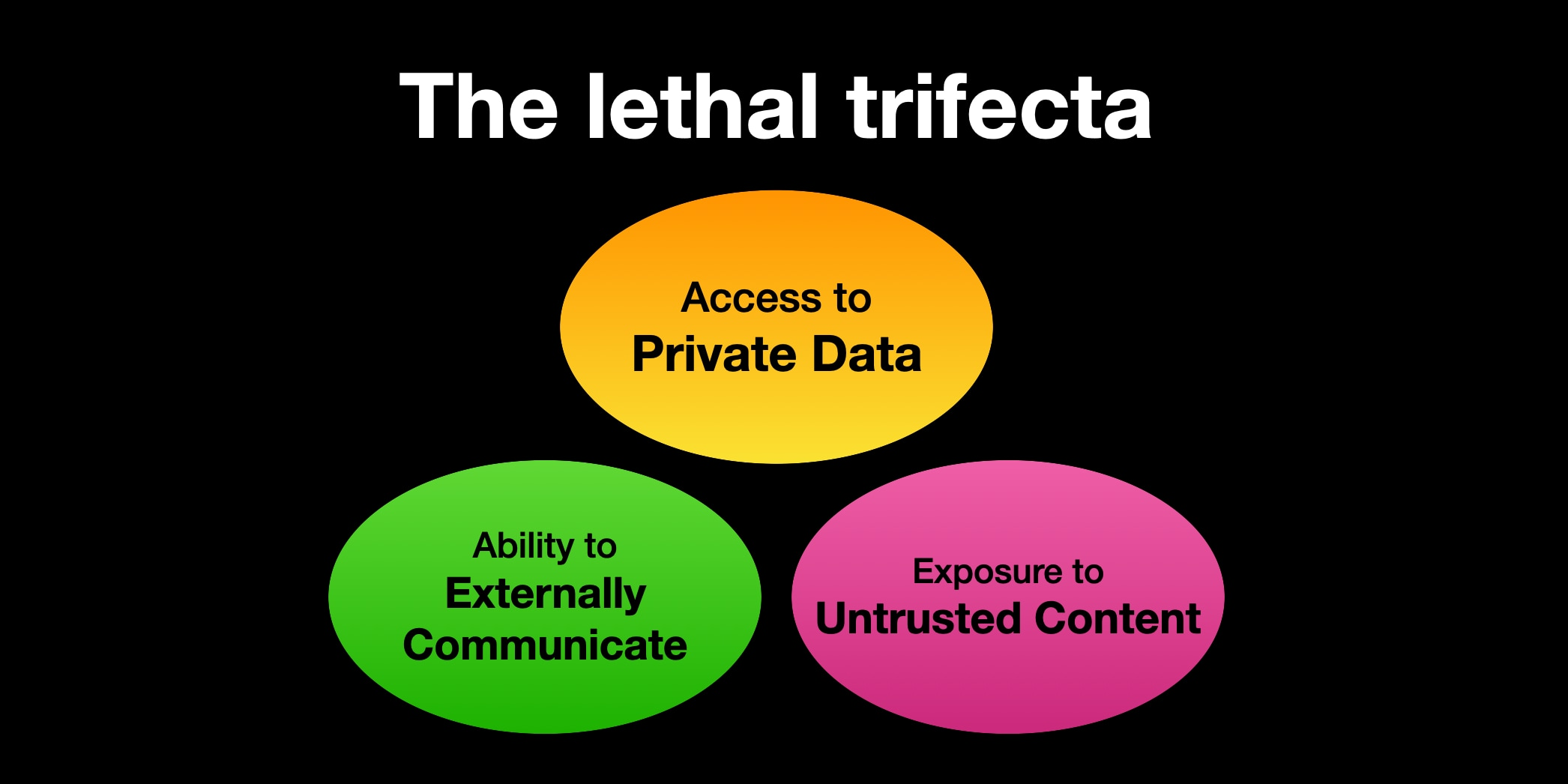
- What untrusted content is the sandbox exposed to?
- How can they externally communicate?
- What sensitive data are we providing to the sandbox?
Anthropic provides several sandboxing tools specific to Claude Code:
- Claude Code’s Sandbox Bash tool, which uses
sandbox-execunder the hood for OS X users. This is the same technique Chromium uses - Claude Code’s experimental sandbox runtime, which also uses sandbox-exec for OS X users
- Anthropic provides a devcontainers template for working with Claude Code that will apply a firewall to allowlisted IPs.
Cursor also has a similar sandboxing feature for Mac users that uses sandbox-exec under the hood for the Cursor IDE. OpenAI’s Codex CLI also supports a sandbox argument that uses sandbox-exec. We’re super excited to see all the new tools to limit what access these agentic coding tools have to our host!
You could also write your own sandbox using gVisor or Firecracker VMs! The themes around network isolation and proxies should transfer.
What is the worst a sandbox can do?
Although the specifics of the sandbox technology affect the level of isolation, a sufficiently sandboxed Claude Code can make a sandboxed Claude Code look like a separate host.
- What network access am I allowing Claude Code to have?
- What actions can Claude Code perform with this network access and the data it has?
For example, almost all Claude Code instances have access to Anthropic API keys to be able to interact with the Anthropic API.
Claude Code has access to all environment variables present in your terminal session (which are propagated to the Claude Code sandbox), and Claude Code has access to read the files from the directory where you run claude.
Unfortunately, a lot of software requires secrets. For example, development on third-party integrations requires using secrets.
This makes having separate development, staging, and production integration credentials especially valuable, but even development integration credentials are not designed to be publicly accessible: otherwise, they wouldn’t be credentials!
- What data am I providing to Claude Code?
- What secrets or environment variables will Claude Code have access to?
- Are the files (including the source code) I’m providing to Claude Code open-source or public?
Consider the precedence of dotenv files to manage secrets on your local repo. Making sure that these .env files are properly .gitignored and .dockerignored is no longer sufficient: leaving these .env files in a folder where you are running claude gives Claude Code access to these secrets.
You could also write your own sandbox using gVisor or Firecracker VMs! The themes around network isolation and proxies should transfer.
Unpacking the devcontainer firewall
The provided devcontainer template has an init-firewall.sh script that applies a firewall to the devcontainer running Claude Code. This firewall permits network connections to the following hosts by default:
- registry.npmjs.org: allow installing npm packages
- api.anthropic.com: interact with Anthropic’s API
- sentry.io: a logging and error observability product that Anthropic is using
- statsig.anthropic.com/statsig.com: a feature flagging product that Anthropic is using
- marketplace.visualstudio.com: enable installing VSCode extensions
- vscode.blob.core.windows.net/update.code.visualstudio.com: a blob store used by VSCode
- GitHub’s web, API, and git servers
This firewall is enforced at the IP layer: the init script performs a dig to resolve these hosts’ IP addresses and uses iptables to allow connections to these IPs. This does mean that the particular connection to these hosts is not necessarily enforced at the TLS/HTTP layers; for example, an AWS ALB on an allowlisted IP that routes traffic based on SNI or Host headers could still receive requests that specify different hosts.
In addition, the firewall supports inbound and outbound traffic to any IP address on port 22 for SSH connections.
If we:
- Use this firewall
- Provide environment variables we would not want to be publicly accessible
- Run the devcontainer with
claude –dangerouslyUnsafePermissions
The devcontainer could exfiltrate sensitive data, including credentials, via a variety of ways:
- Connect to a random IP over port 22
- Create an npm package with the secret in the tarball
- Create a github gist with the credentials
Even if we only HTTP traffic to a select set of hosts, this problem remains challenging because of Domain Fronting: there are often a huge diversity of actions you can perform on a single domain. Applying restricted privileges to these kinds of domains at the IP, domain, or even host level is often not fine-grained enough to allow the actions you want to allow and block the actions you want to block. In fact, prompt injection attacks in particular have taken advantage of overly broad domain allowlists to exfiltrate sensitive information!

The specifics of what kind of network traffic you want to permit and not permit often requires looking at the application layer.
Using network proxies to prevent secrets exfiltration: hiding the ANTHROPIC_API_KEY from Claude Code
Thankfully, Claude Code supports using proxies to route traffic! There are two ways to configure Claude Code to use proxies:
- A HTTP_PROXY environment variable that applies to all Claude Code HTTP traffic. This proxy environment variable intercepts HTTP traffic that the parent Claude Code process makes.
- A sandbox httpProxyPort. This intercepts HTTP proxy traffic for bash commands executed from within the sandbox.
Note that these proxy configurations are independent of each other: the HTTP_PROXY environment variable will not intercept HTTP traffic from bash commands in the sandbox, and the sandbox httpProxyPort will not intercept HTTP traffic from the Claude Code CLI tool that is outside of the sandbox.
You can configure Claude Code to use an HTTP proxy using the following configuration in settings.json:
{
  "sandbox": {
    "network": {
      "httpProxyPort": 8080
    }
  }
}
With transparent proxies like the Formal Endpoint, you don’t need to use any of these settings either! The Formal Endpoint runs on the developer’s laptop, and its Transparent Mode intercepts TCP connections at the operating system’s network layer (a Network Extension on macOS).
formal transparent-proxy install
formal transparent-proxy enable
formal transparent-proxy status
Network rules select which connections Transparent Mode intercepts. Network rules are CEL expressions that run at three stages of a connection: pre_tcp (before the connection is diverted), pre_tls (before TLS is terminated), and post_tls (after Formal classifies the plaintext protocol). They can see the destination hostname and the process that opened the connection, including its code-signed identity and its ancestors. For example, process.is_claude_cli is true when the connecting process or any of its ancestors is Claude Code. A single rule therefore covers both the Claude Code CLI and the bash commands it spawns inside its sandbox:
{
  "condition": {
    "pre_tcp": process.is_claude_cli && hostname == "api.anthropic.com",
    "pre_tls": process.is_claude_cli && hostname == "api.anthropic.com",
    "post_tls": true
  }
}
By itself, this rule makes the Endpoint terminate TLS for Claude Code’s Anthropic traffic, log every request, and evaluate policies on the laptop. To keep the API key out of Claude Code, we also need somewhere to keep the real key.
Tying a developer’s permissions to their Claude Code permissions: proxying Claude Code to the Formal Connector
Our customers use Formal to apply least privilege to both human and machine identities. You can also leverage Formal to decouple human & machine identities from Native Users and apply fine-grained least privilege at the application layer. A lot of the techniques to apply organizational least privilege are relevant for applying least privilege to Claude Code sandboxes: if your organizational permissions are sufficiently constrained, the blast radius of a rogue Claude Code with a developer’s credentials should be small as well.
To date, Admin Anthropic API Keys inherit the full permissions of the user who created them, and there is no ability to make API keys more fine-grained. API keys generated from the Claude API for Claude Code, however, seem to have restrictions on what API endpoints they are allowed to use, but we have not found documentation on the exact permissions that are allowed versus disabled.
Developers may want to use Claude Code to write and run code that uses an Admin Anthropic API Key. If they pass the API Key via an environment variable, the sandbox will have access to this Admin Anthropic API Key. An organization, however, may want to prevent certain API actions from being taken with an Anthropic API Key and have logging on who is performing which API actions. Developers may not notice the distinction as well!
The best way to prevent Claude Code from leaking an API Key is to make sure that it never has direct access to the credentials in the first place! One can use Formal Connectors, Formal Resources, and Native Users to make sure that Claude Code cannot leak the API Key. That way, the Formal Endpoint forwards Claude Code’s requests to the Connector with the developer’s Formal identity, and the Connector injects actual secrets when communicating with the upstream API.
Injecting the Anthropic API Key on the Connector
The Formal Connector, not the laptop, stores the real Anthropic API Key, so the key is not present on the developer’s machine at all.
First, create an LLM resource for the Anthropic API and make it reachable through a Connector listener:
resource "formal_resource" "anthropic" {
  name       = "anthropic-api-resource"
  technology = "llm"
  hostname   = "api.anthropic.com"
  port       = 443
}

resource "formal_connector_listener" "anthropic" {
  connector_id = formal_connector.example.id
  name         = "anthropic-listener"
  port         = 443
}

resource "formal_connector_listener_rule" "anthropic" {
  connector_listener_id = formal_connector_listener.anthropic.id
  type                  = "resource"
  rule                  = formal_resource.anthropic.id
}
Next, store the API Key as a Native User. An http_api_key_header Native User makes the Connector set the x-api-key header on every request it forwards upstream, replacing whatever value the client sent. With environment_variable, the Connector reads the key from its own environment, so the key is not stored in Formal or in Terraform state. Select it as the default Native User so that requests do not need to request a label:
resource "formal_native_user_v3" "anthropic" {
  resource_id = formal_resource.anthropic.id
  label       = "claude-code"

  http_api_key_header {
    key = "x-api-key"
    value {
      environment_variable = "ANTHROPIC_API_KEY"
    }
  }
}

resource "formal_resource_native_user_selection" "anthropic" {
  resource_id = formal_resource.anthropic.id
  cel         = "\"${formal_native_user_v3.anthropic.id}\""
}
The default selection is a CEL expression over the Formal identity, so you can give different teams different Anthropic keys (for example, "platform" in user.groups ? "<platform key>" : "<default key>").
Finally, add outputs to the network rule from earlier so that the Endpoint forwards Claude Code’s Anthropic traffic to the Connector:
resource "formal_network_rule" "claude_code_anthropic" {
  name        = "claude-code-anthropic"
  description = "Forward Claude Code's Anthropic traffic to the Connector"
  status      = "active"

  cel_expression = <<-EOT
    {
      "condition": {
        "pre_tcp": process.is_claude_cli && hostname == "api.anthropic.com",
        "pre_tls": process.is_claude_cli && hostname == "api.anthropic.com",
        "post_tls": true
      },
      "outputs": {
        "forward_to_connector": true,
        "resource_name": "anthropic-api-resource"
      }
    }
  EOT
}
resource_name forwards every intercepted request to the anthropic-api-resource resource, including requests that Formal does not classify as LLM traffic, such as uploads to the Files API. The Endpoint also attaches the developer’s Formal identity to each forwarded request, and strips any Formal identity headers that Claude Code tried to set itself. Neither Claude Code nor its sandbox needs Formal credentials. The Connector attributes every request to the developer who made it and selects a Native User for them.
Run claude with the ANTHROPIC_API_KEY environment variable set to an invalid API key:
ANTHROPIC_API_KEY=sk-ant-dummy claude
From the perspective of Claude Code, all API responses from api.anthropic.com will appear as if sk-ant-dummy is a valid API key! Claude Code keeps using the default hostname and port for the Anthropic API.
This technique is not unique to Anthropic API Keys. For example, Keep Stripe API Keys Off Laptops walks through the same setup for the Stripe API: the Connector holds the Stripe API key, a Native User injects it as an Authorization: Bearer header, and clients keep calling https://api.stripe.com without a credential. Repeat this for each third-party API that Claude Code or the code it runs needs, and write a network rule that forwards those hostnames to the Connector. The real credentials are injected only after the request has left the Claude Code process, its sandbox, and the laptop.
Applying fine-grained least privilege policies
We could then create a policy in a similar way to the policy we created for the local Github MCP server use case.
package formal.v2

import future.keywords.in

request = { "action": "block", "type": "block_with_formal_message"}
if {
  input.resource.name == "anthropic-api-resource"
  input.http.method == "POST"
  input.http.path == "/v1/files"
}
If we change the path param to “/v1/messages,” we can confirm that this policy is able block requests to the Anthropic API even outside of the Claude Code sandbox:
> what about preventing uploads to the file api?
  ⎿  API Error: 403 {"error":"Connection blocked by policy policy_01k8vrfkefm4vnjyv024fhakp: "} · Please run /login
We also get visibility into every request being made to the Anthropic API across our organization!
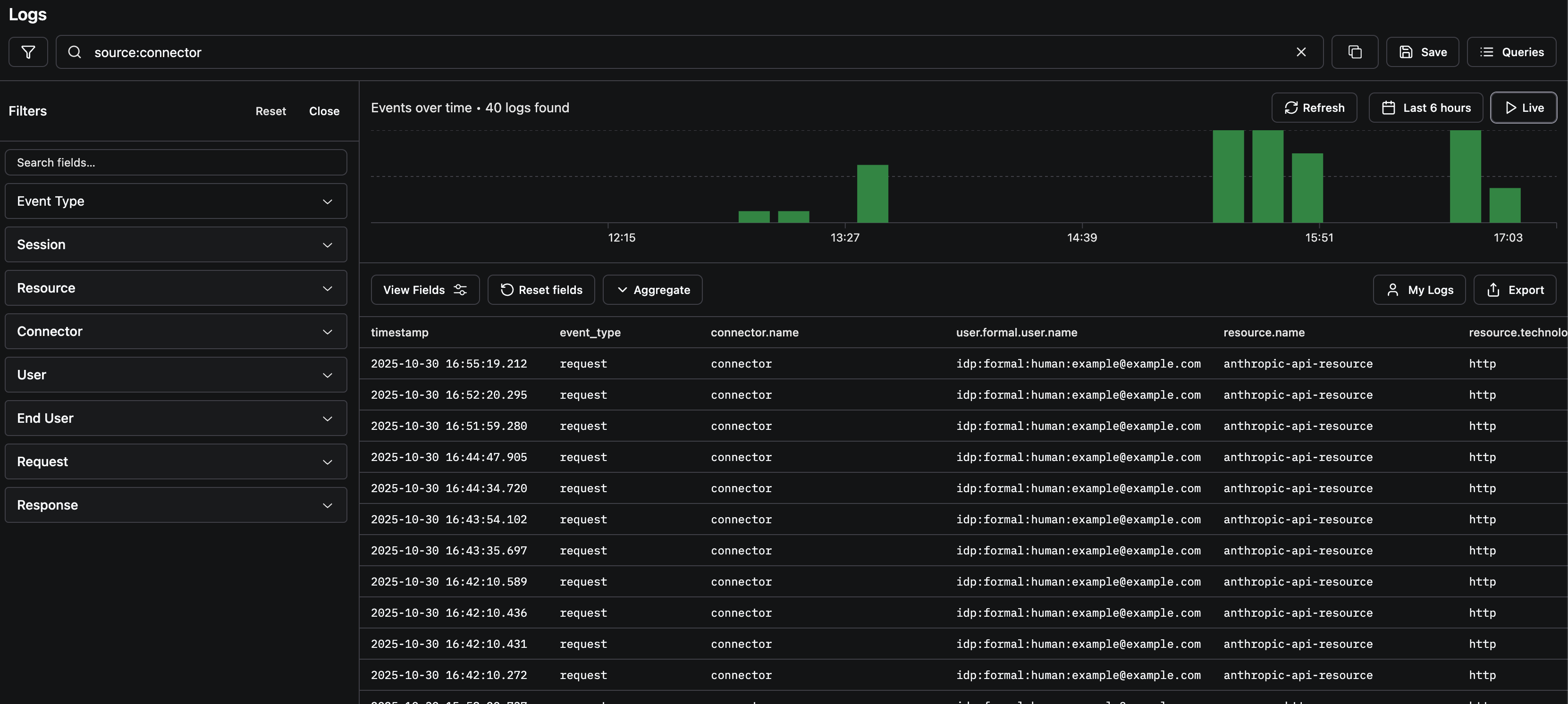
Of course, this technique was not specific to safeguarding Anthropic API Keys: one can use HTTP proxies and Claude Code sandboxes to enforce least privilege for your API Keys even if you want to enable Claude Code to use some of these APIs!
Proxies as a result can help in two dimensions of the lethal trifecta:
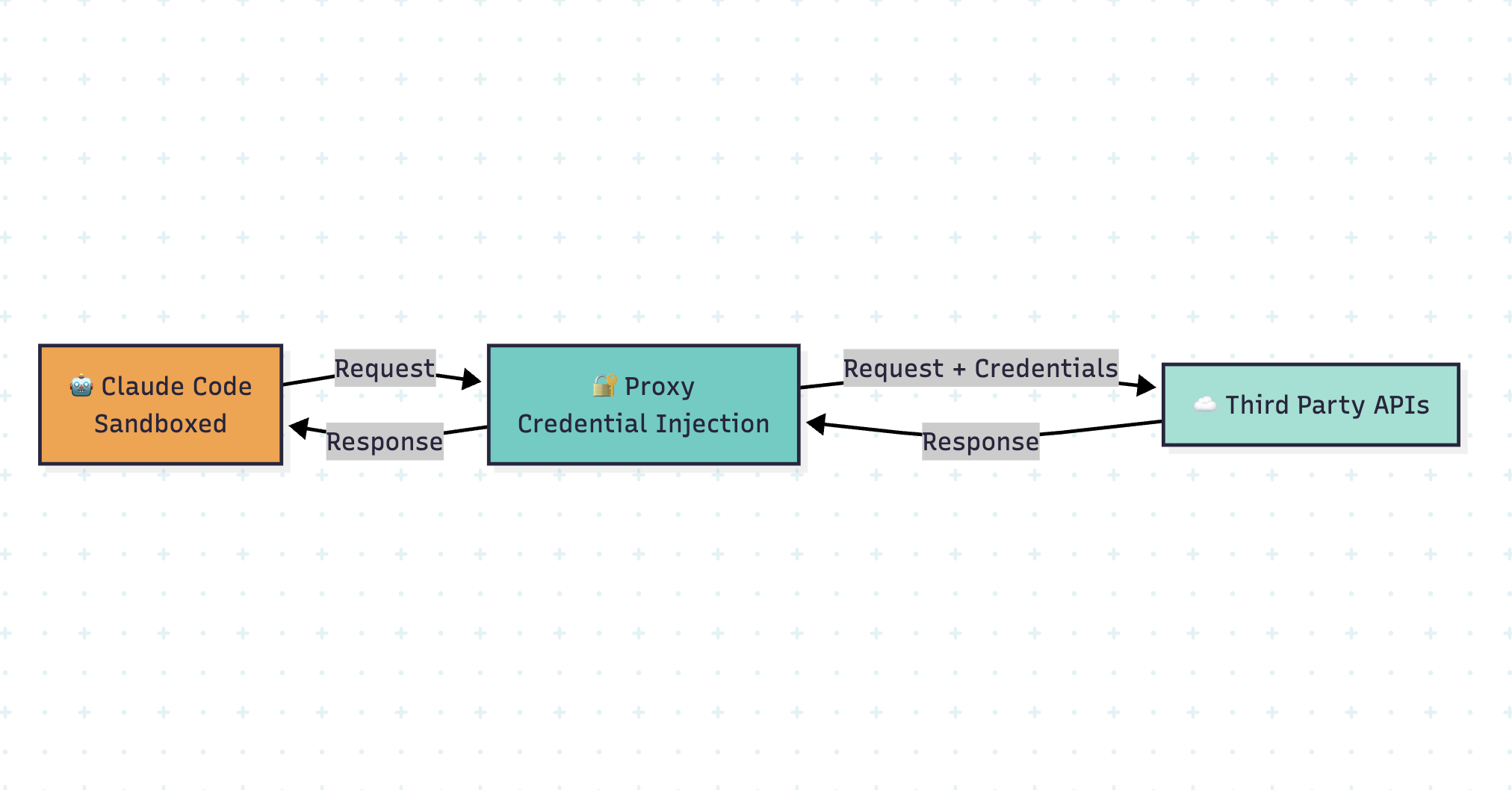
- Proxies can limit the ability to externally communicate by allowing or blocking traffic.
- Proxies can also limit an agent’s access to private data if they don’t need to read that data for inference. Credentials can be injected for actions the agent wants to take with those credentials without allowing the credential to be available to a language model’s context window.